


Membership Guide

Benefits for Membership Tier

Membership: Join & Level & Benefits
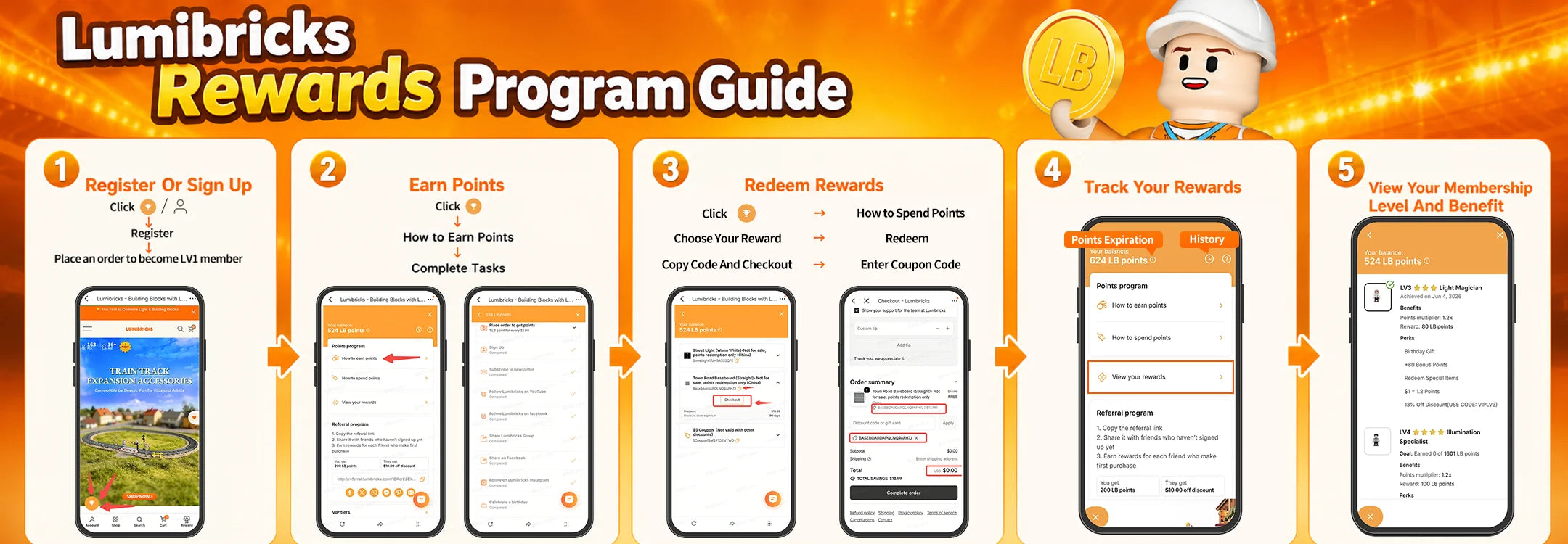
You can register as a Lumibricks member in either of the following ways:
- Click Create a Store Account at the top of the official website.
- Click the Rewards icon at the bottom left of the official website and complete the registration.
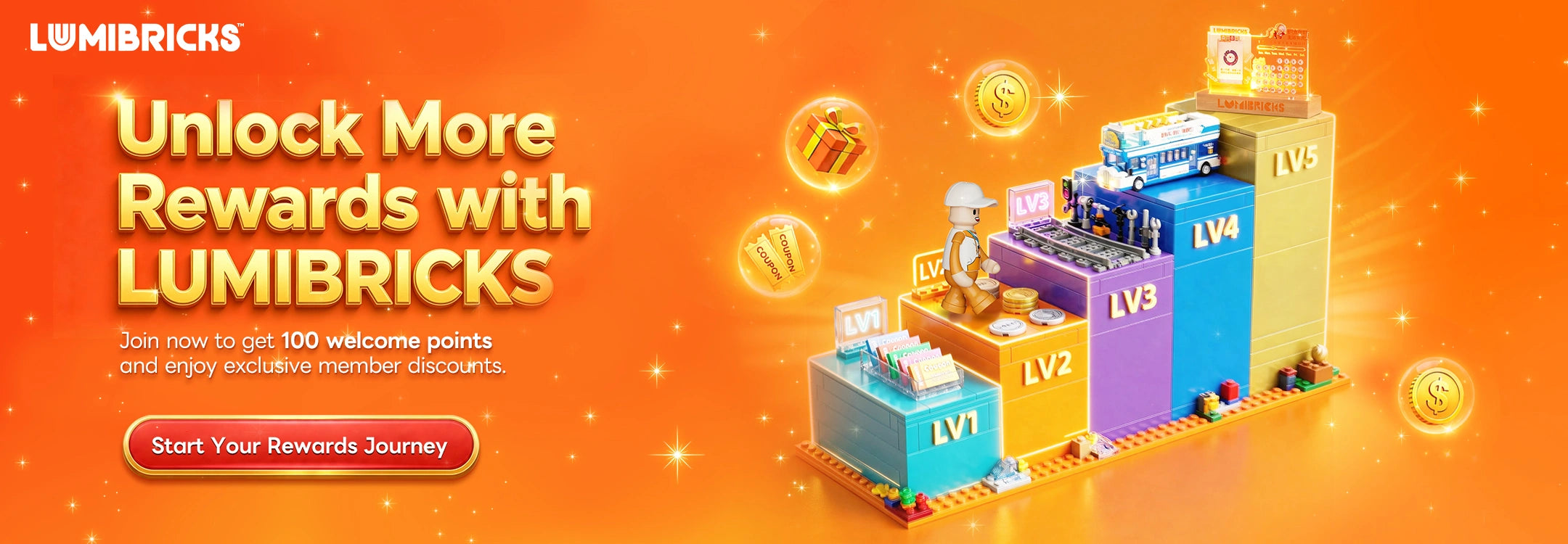
After successful registration, you will officially become an LV1 member once you place your first order on the Lumibricks official website. As a member, you can participate in points activities, earn LM points, and enjoy exclusive membership benefits.
To become an LV1 member, the following two conditions must be met:
- Your account must have at least 1 LB point.
- You must have placed your first order on the Lumibricks official website.
If you have only completed points tasks but have not yet placed your first order on the official website, your membership level may not be displayed or counted yet.
After becoming a member, you can enjoy the following benefits:
- Earn LB points
- Redeem points for coupons and gifts
- Member-exclusive discounts
- Membership level benefits
- Birthday benefits
- Access to exclusive member events
As your membership level increases, you will unlock more exclusive benefits and rewards.
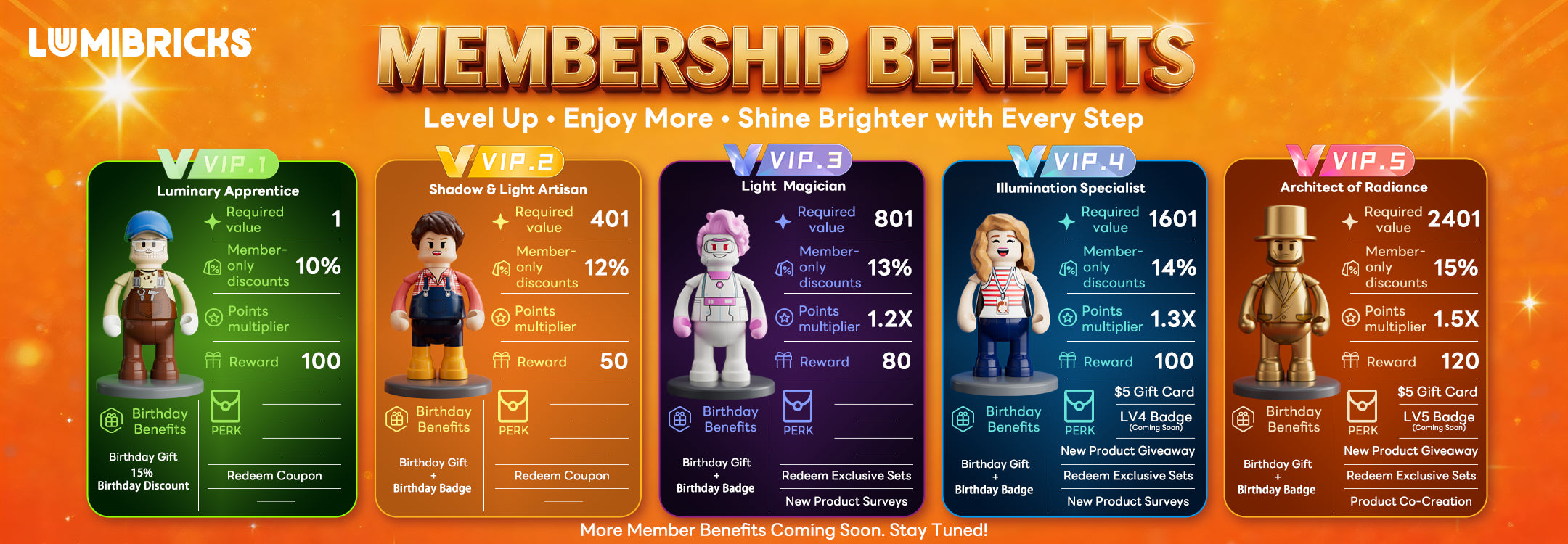
Members at different levels can enjoy different benefits, including:
- Higher points earning rates
- Birthday gifts
- Birthday badges
- Exclusive offers
- Access to higher-level member gifts or exclusive events
For details about membership level benefits, please visit the Lumibricks Rewards page:
https://www.lumibricks.com/pages/reward
Your membership level is valid for 365 days from the date it is earned.
For example, if you reach a certain membership level on January 1, 2024, your level will be recalculated after December 31, 2024, based on the growth value you earned during the past year.
If your growth value during the validity period is not sufficient to maintain your current level, your membership level may be downgraded.
LB Points: Earn & Check & Upgrade
You can click the Rewards icon at the bottom left of the official website and go to How to Earn Points to view available points tasks.
Common ways to earn points include:
- Registering a member account: earn 100 LB points
- Placing orders on the official website: $1 = 1 LB point
- Following Lumibricks on social media, sharing, commenting, subscribing to emails, etc.
- Completing brand surveys or participating in social media UGC activities: earn 50 LB points
- Submitting new product ideas, product experience feedback, or website experience feedback: earn 50 LB points
- Filling in your birthday information and completing the required action on your birthday
- Receiving extra points rewards when upgrading your membership level
Membership upgrade rewards are as follows:
- LV2: +50 LB points
- LV3: +80 LB points
- LV4: +100 LB points
- LV5: +120 LB points
To participate in UGC activities and other special points campaigns, you are welcome to join our Facebook group:
https://www.facebook.com/groups/834482964402781
The crediting time varies depending on the type of points:
- Order points and email subscription points
These are usually updated in your account within 24 hours. - Sharing, reposting, commenting, and other action-based points
These are usually updated in your account within 48 hours. - Survey, UGC, product experience, or website feedback points
These points require review and will be added manually by customer service.
Please make sure to place orders using the same email address as your member account. Otherwise, points may not be recorded automatically.
LB points can be used to redeem coupons or gifts, while growth value is used to determine your membership level.
In general:
$1= 1 LB point = 1 growth value
However, not all points count toward growth value. For example, points manually added by customer service, survey points, and membership upgrade reward points usually do not count toward membership level growth value.
Membership levels are mainly calculated based on eligible purchases and eligible store activity points.
Points that usually count toward growth value include:
- Points earned from orders placed on the official website
- Points earned from eligible reviews, activities, and other qualifying actions
The following points usually do not count toward growth value:
- Points manually added by customer service
- Points added for past order adjustments
- Points manually added for surveys
- Points deducted due to refunded orders
- Expired points
Your membership level is determined by your growth value, not by your total points balance.
Your points balance may include points that do not count toward growth value, such as:
- Points manually added by customer service
- Survey points
- Points added for past order adjustments
- Membership upgrade reward points
- Expired points
- Points generated from refunded orders
Therefore, even if you have a high points balance, you may not yet have reached the required growth value for the next membership level.
You can check your points balance by following these steps:
- Click the Rewards icon at the bottom left of the official website.
- Log in to your member account.
- View Your Balance.
You can also click History to check your points earning, redemption, and expiration records.
LB points are valid for 365 days.
Seven days before your points expire, the system will send you an email reminder. Please use your points before they expire. Expired points cannot be restored.
You can also click the Rewards icon at the bottom left of the official website and check the expiration reminder next to Your Balance.
The points system can only apply one multiplier at a time.
The multiplier priority is as follows:
- Birthday multiplier
- Promotional campaign multiplier
- VIP level multiplier
For example, if a campaign offers a 1.3x points multiplier, the campaign multiplier will take priority over the VIP level multiplier.
Rewards * Coupons: Redeem & Use & Return
Please follow these steps:
- Log in to your member account.
- Click the Rewards icon at the bottom left of the official website.
- Go to Ways to Redeem.
- Select the coupon or gift you would like to redeem.
- Click to redeem if you have enough points.
- Go to View My Rewards.
- Copy the coupon code or click Check Out.
- Enter and apply the coupon code on the checkout page.
If you do not have enough points, click View Actions to Earn More Points to continue earning points.
Currently, points can be redeemed for:
- Coupons
- Brick lighting accessories
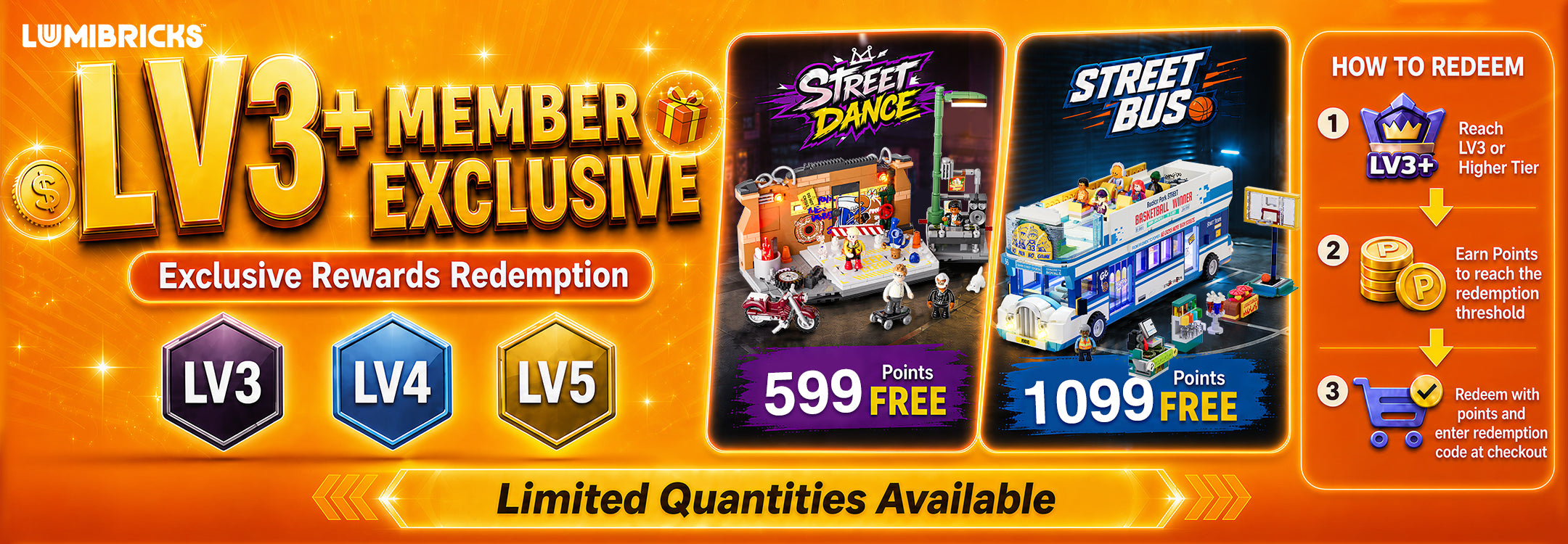
- Limited-edition sets
- Creative merchandise
- MOC gifts
- Other member-exclusive rewards
We will continue to update more points rewards in the future, including MOC accessory packs, minifigure packs, animal packs, track/road expansion packs, holiday limited gift boxes, and exclusive gifts for higher-level members.
No. After redeeming a gift, you still need to complete the checkout process:
- Click View My Rewards.
- Find the gift you have redeemed.
- Click Check Out.
- Apply the corresponding gift coupon code at checkout.
- Fill in your shipping address and complete the order.
The gift will only enter the shipping process after the order is completed.
Most points redemption gifts are stocked in our China warehouse, so you need to select the Global option when redeeming them.
Please select Global and fill in your shipping address. We will arrange shipment based on your order information.
Please follow these steps:
- Click the Rewards icon at the bottom left of the official website.
- Go to View My Rewards.
- Find the coupon you have redeemed.
- Copy the coupon code and click Check Out.
- Select the products you would like to purchase and proceed to checkout.
- Paste the coupon code into the discount code box and click Apply.
No.
Coupons redeemed with points cannot be combined with other official website discounts, promotional offers, new product discounts, or other discount codes.
At checkout, you will need to choose either the points coupon or another discount.
Common reasons include:
- The product already has a discount and cannot be combined with a points coupon.
- The coupon has expired.
- The coupon code was not copied or entered correctly.
- The order does not meet the coupon usage requirements.
- The system can only apply one discount code at a time.
If the current product discount is greater than the discount offered by your points coupon, the system may not allow the points coupon to be applied.
Coupons redeemed with points are valid for 90 days.
Once a coupon expires, it can no longer be used. If you have any questions about an expired coupon, please contact us at:
service@lumibricks.com
Click the Rewards icon at the bottom left of the official website and go to View My Rewards to view your redeemed coupons and gifts.
You can click the corresponding reward to view details, copy the coupon code, or continue to Check Out.
Yes, but only for rewards that have been redeemed, not yet used, and are still within the validity period. If the reward is available and has not been used in an order, you can try to return it by yourself. Please follow these steps:
- Open the Rewards membership pop-up at the bottom left of the official website, or go to the Redeem Rewards page.
- Find Available Rewards, or click View Your Rewards to view your available rewards.
- Select the reward you would like to return and click the return icon below the reward name.
- In the confirmation pop-up, click Yes, return reward.
- Once completed, the reward will be returned, and the LM points used for redemption will be credited back to your account.
Please note:
- Only redeemed but unused rewards can be returned.
- Coupons or gifts that have been used, expired, or applied to an order cannot be returned.
- Expired or used rewards usually will not display the return button.
- Once a discount code has been used or has expired, it cannot be regenerated or restored.
If you are unable to complete the return on the page, please contact Lumibricks customer service at:
service@lumibricks.com
Birthday Benefits & Account Support
During your birthday month, you can contact Lumibricks by email and provide your order number to claim your birthday gift and birthday discount.
Contact email:
service@lumibricks.com
The requirements for receiving a birthday gift vary by membership level:
- LV1 / LV2: Orders placed during the birthday month must reach $200
- LV3: Orders placed during the birthday month must reach $150
- LV4: Orders placed during the birthday month must reach $120
- LV5: Any order placed during the birthday month qualifies
Birthday gifts may vary each month and are subject to the current monthly campaign arrangement.
Please note: If the same order has already participated in another store gift promotion, it cannot be used to claim a birthday gift at the same time. However, other eligible orders can still participate in the birthday gift campaign.
To claim your free Birthday Badge:
🕑Event Period: July–December 2026
1️⃣Submit your birthday on the Birthday Benefits page before the end of your birthday month.
2️⃣Check your email during your birthday month for your redemption coupon.
Place an order and use the coupon to redeem your Birthday Badge for free.
🔻Birthday Benefits: https://www.lumibricks.com/pages/birthday-benefits
⚠️Eligibility & Rules
🔸Available to Lumibricks LV2 members and above.
🔸The Birthday Badge can only be claimed during your birthday month.
Each member may claim one Birthday Badge per year.
🔸Requests submitted after your birthday month are not eligible.
Lumibricks reserves the right to reject claims involving false or fraudulent information.
If an order is fully refunded:
- The points used for redemption will be returned to your account.
- The points earned from that purchase will be deducted.
For partial refunds, points will be adjusted based on the actual refund amount.
In general, order points will be credited automatically based on your membership level points multiplier.
If your points have not been credited, please contact us by email and provide your order number:
service@lumibricks.com
Please make sure that the email address used for your order is the same as the email address registered to your member account. Otherwise, points may not be recorded automatically.
LB points are usually accumulated only in the member account associated with the registered email address. Points cannot be transferred, sold, or merged across accounts.
If you need to transfer order points from another email address, please contact us at:
service@lumibricks.com
Please note:
- Registration points, email subscription points, sharing points, and other task-based points cannot be merged.
- Only order points, campaign points, survey points, and review points may be eligible for transfer.
- Transferred points can only be added to your points balance and will not count toward membership level growth value.
Points can only be added for orders placed on the Lumibricks official website within the past 3 months.
If the order email address is the same as your member account email address, points are usually added automatically.
If the order was placed using another email address, please send your order number to:
service@lumibricks.com
We’re sorry, but orders placed on other platforms cannot earn LB points.
Due to technical and platform-related limitations, only orders placed through the Lumibricks official website are eligible for points.
Please first confirm that you have completed the following steps:
- Found the redeemed gift in View My Rewards
- Clicked Check Out
- Applied the gift coupon code at checkout
- Filled in your shipping address and completed the order
If you have completed the order but the gift has still not been shipped, please contact us by email and provide your order number:
service@lumibricks.com
You can click the Rewards icon at the bottom left of the official website to check your points balance, points expiration date, redemption history, and coupon status.
We will also usually notify you by email in the following cases:
- Points have been credited
- Points are about to expire
- A coupon is about to expire
- Your membership level has been upgraded
- Birthday benefits are available to claim
- Other member activity notifications
Please check emails sent to the email address linked to your member account.
If any of the following actions are found, Lumibricks reserves the right to freeze points, cancel membership eligibility, or remove points:
- Fake transactions
- Abusing the points system
- Malicious refunds
- Misuse of coupons
- Other violations of membership rules
If you have any questions about LB points, membership levels, points redemption, coupon usage, or birthday benefits, please contact us at:
service@lumibricks.com
